jinsoku
z3 600mm
The
600mm
metric associated with the Genmitsu
Jinsoku Z3
refers to its maximum engraving speed of 600
mm/s
(or 36,000 mm/min), enabled by its Galvo
laser technology.
It does not indicate a physical machine dimension or a 600mm axis
extension. [1,
2]
Core
Specifications
Laser
Module:
5W
/ 5.5W compressed spot diode laser
Engraving
Speed:
Up to 600 mm/s
Precision
Spot Size:
0.05
mm
Design
Feature:
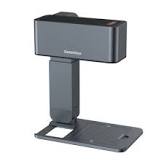
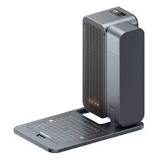
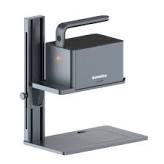
Foldable, portable frame with an open/removable hollow base
Focus
System:
One-touch motorized auto-focus height adjustment
Module
Rotation:
Up to 180° for bevel and vertical surface engraving [1,
2,
3]
Key
Capabilities
Engraving
Materials:
Wood, leather, dark acrylic, anodized aluminum, painted ceramics,
slate, and fabric.
Cutting
Limits:
Can cut thin, soft materials like paper,
cardboard, and 2-3mm light plywood
using multiple slow passes.
Software
Control:
Interfaces via the custom smartphone app or computer software to
manage speed, power, and image framing previews. [1,
2,
3]
Are
you looking for help troubleshooting the Jinsoku Z3 speed settings,
or are you trying to configure your design software for output?

SainSmart.com
Engravable
Materials ; 600mm/s (1417"/min) · Paper, Wood, Bamboo,
Cloth, Acrylic, Plastic, Leather, Bread, Fruit, Glass, Ceramic

Amazon.ae
What
Windows software does it use?
The
Genmitsu
Jinsoku Z3
uses a specialized, proprietary Windows software simply called
Engraver
(developed natively by its original manufacturer partner,
Wainlux/Vevor). Because the Z3 features a high-speed Galvo mirror
system instead of a standard G-code driven gantry, standard
open-source laser programs will not control it out of the box. [1,
2]
1.
Factory Software ("Engraver")
Where
to find it:
Preloaded on the USB
flash drive
included in the box.
Installation:
Located under the USB
Flash Drive / windows / software / Engraver /
path.
Supported
Formats:
Best suited for standard image files (JPEG,
PNG, BMP, GIF)
and basic vector lines (DXF,
PLT, HPGL).
Capabilities:
Simple plug-and-play layout, speed and power adjustments, and direct
material presets. [1,
2,
3]
2.
Can you use LightBurn or LaserGRBL?
Standard
Compatibility:
No.
Out of the box, the Jinsoku Z3 is not
compatible
with industry-standard third-party programs like LightBurn
or LaserGRBL
because its proprietary mainboard cannot native-translate standard
linear coordinate G-code into the mirror-galvanometer movements. [1,
2]
The
Firmware Workaround:
Advanced users in the LightBurn
Community Forums
have successfully flashed modified GRBL
1.1f firmware
to the board. However, this configuration process is highly complex,
can potentially brick the controller board, and often loses some
automatic features like motorized auto-focus. [1,
2]
For
the easiest experience on Windows, it is highly recommended to design
your graphics in an external program (like Canva, Adobe Illustrator,
or Inkscape) and import the files directly into the native factory
Engraver
software. [1,
2]
Are
you currently having trouble locating the software installer file on
your USB drive, or are you trying to pair the software to the machine
over USB?

LightBurn
Software Forum
Aug
5, 2024 — If you flash the incorrect laser GRBL firmware to the
Z3, you might get an error message like this: Homing cycle is not
enabled in...


Amazon
Web Services (AWS)
I
no longer have the USB Flash Drive.
No
problem. I have made a note that you don't have the original drive
anymore.
You
can easily replace all of those original files by downloading them
directly from the manufacturer. [1]
1.
Download the Windows Software & Drivers
SainSmart
hosts the exact contents of that lost flash drive online: [1]
Go
directly to the official SainSmart Jinsoku Z3 Resource Directory.
Download
the Windows
Software Installation Package
and the CH340/CH341
USB Driver.
Alternatively,
if your computer is not nearby, you can view or download the
digital backup version of the Jinsoku
Z3 Laser Machine User Manual.
[1,
2]
2.
Setup Instructions
Run
the downloaded USB
driver
installer first so your Windows PC can recognize the laser over a
USB cord.
Extract
and install the Engraver
desktop software.
Turn
on the Z3, connect the USB cable, and the software should
auto-detect the matching COM port. [1,
2,
3]
Alternative:
Use the Mobile App
If
you do not want to deal with Windows cables, the machine features
built-in Bluetooth. You can download the Genmitsu
mobile app on iOS or Android to import images and run projects
directly from your phone. [1,
2]
Are
you planning to connect the laser to your computer via USB, or would
you like help getting the Bluetooth mobile app configured instead?
[1]
Oct
29, 2025 — Open Device Manager on your computer. If you see a
yellow exclamation mark, reinstall the USB driver. Try a different
USB port or ...


SainSmart
Resource Center
I'm
not finding Engraver software anywher on the Genmitsu site. I've send
them an email, but in the meantime can you help me. I gather this
device was manufactured by another company and rebranded Genmitsu, is
that correct?
Yes,
your suspicion is exactly correct. The Jinsoku
Z3
is a rebranded
Wainlux
Z3 Foldable Laser Engraver.
Genmitsu (SainSmart) partnered with Wainlux to distribute the
hardware under their own "Jinsoku" sub-brand. [1,
2,
3]
Because
it is a rebranded machine, you do not have to wait for Genmitsu's
email support. You can download the missing software directly from
the original manufacturer.
Where
to Download the Software Right Now
Wainlux
hosts the standard desktop "Engraver" software on a
universal download directory. [1]
Go
to the official Wainlux
Software Download Page.
Click
the external link provided on that page (it will redirect you to
their hosting server domain at http://www.dkjxz.com/).
Look
for the Z3
Software Package
folder. Download the Windows installer .exe
file along with the CH340/CH341
Driver
if your computer doesn't recognize the USB connection. [1,
2,
3]
Working
with the Rebranded Hardware
Cross-Compatibility:
Because the internal board is identical, the Wainlux version of the
desktop software will recognize your Jinsoku-branded machine
instantly via USB cable. [1,
2]
Mobile
App Alternative:
If you ever want to use a phone or tablet, you can search your app
store for the Wainlux
App
or CutLabX
(Wainlux's updated software platform), which will pair with the
laser over its built-in Bluetooth. [1,
2]
Once
you get it downloaded, are you planning to do basic photo engraving
(JPEG/PNG) or are you working with vector line files (DXF)?